
It's Friday, and the sefer has to be ready for Shabbat. It was left open at Masei, at the end of Bamidbar, and tomorrow's reading starts at Deuteronomy 1:1. That is exactly what NavTorah is for. From a photo of the open column, it tells you where the sefer is open, how many columns to roll and which way.
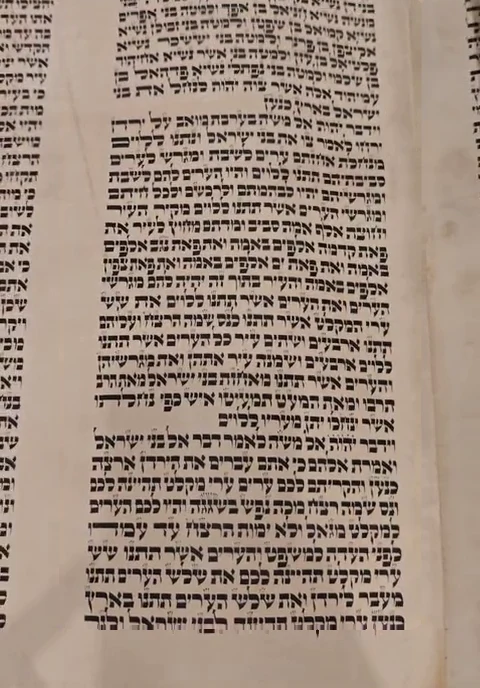
To find its place, the app reads the column (mistakes and all) and searches for those words among the Torah's 80,316. It doesn't need to know what each column looks like, so it works with any sefer. The photo in this post is a frame from one of the tests we recorded, and what's drawn over it comes from running the app's code on it.
Step 1The photo
The photo is a frame from the screen recording of one of our tests, cropped to what the camera showed (we painted out the app's yellow guide). It's 480 by 688 pixels, roughly a quarter of the resolution the app takes photos at. The parchment is yellowed and stained, the column looks narrower at the top than at the bottom because the phone wasn't parallel to the sefer, and the lines bend a little because the parchment isn't flat. Parts of the neighboring columns show at the sides, too.
In the app, everything that follows up to the text being read happens on the phone, and the photo isn't sent anywhere.
Step 2Separating ink from parchment
The first thing the app does is take the lighting out of the photo. The parchment's brightness changes slowly across the photo (a shadow on one side, a lamp on the other, a stain), while ink changes abruptly, from one pixel to the next.
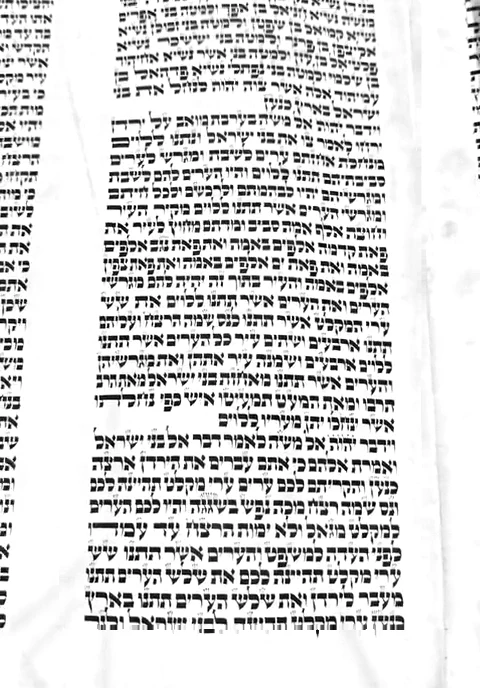
To pull them apart, the app makes a tiny copy of the photo, 160 pixels on its long side. In that copy, each point takes the lightest value among its neighbors. Since the letters are thin, they vanish, and only the background is left. Then the app divides the photo by that background. That is, where there is parchment the result is white, and where there is ink it stays dark, in shade or in light.
If you drag the line over the photo, you'll see the stains and the yellow go away while the letters stay.
Step 3Finding the column
Parts of three columns show in the photo, and the one we want is the middle one. To find it, the app sums the ink from top to bottom at each horizontal position. That sum is drawn below the photo. It's high where there is text and almost zero in the blank margins between columns.
The column is the stretch of text that contains the middle of the photo, between two of those dips. Since the phone may be crooked, before summing the app tries tilting the sum a few degrees each way and keeps the angle that gives the sharpest edges. It also measures the edges in several horizontal bands separately (in this photo, 5), so they follow the perspective. The column is 265 pixels wide at the top and 317 at the bottom.
Step 4Following each line
In a sefer, the lines hang from the sirtut, the rules the scribe scores before writing. That's why they are parallel and evenly spaced, and the app takes advantage of it.
First it measures that spacing. It cuts the column into six narrow strips, sums the ink row by row in each, and looks for how many pixels the pattern takes to repeat. In this photo the lines are 20.2 pixels apart.
Then it cuts the column into wider strips (3 in this photo). In each, the row-by-row sum makes one peak per line (the sums for the first and last strips are drawn at the sides of the photo). If the phone is crooked or the parchment curves, the peaks in one strip don't sit at the same height as those in the next. By comparing neighboring strips, the app measures how much each line rises or falls from one to the other, and builds each line's path from that. In this photo it found 28 lines.
Step 5Cutting and straightening
Each line is cut out along its path, as if the parchment were smoothed flat with your fingers, into a strip 32 pixels high. That way the curves are gone.
The strip is also mirrored. Why? Because the network that reads it goes left to right, and Hebrew is written right to left. Mirrored, the line's first letter comes first and the text comes out in order.
As the network gets it
Flipped back, as we read it
Step 6Reading letter by letter
To read, the app uses a small neural network, 1.8 MB, that runs on the phone (the first version read with Claude, which I tell about in another post). A few convolutional layers look at the shapes of the strokes, and an LSTM that looks both ways along the line adds context. The network moves along the strip 4 pixels at a time and, at each step, says which letter it thinks it sees, or “nothing”.
To get from steps to letters, repeats are merged and the “nothings” dropped (this is called CTC decoding). When the most likely letter over a stretch stays below 50%, the app doesn't guess and writes ?.
↓ repeats merge and the “nothing”s are dropped
- Read
- בנ??ה
- In the sefer
- מנחלת
↓ repeats merge and the “nothing”s are dropped
- Read
- אחזתם
- In the sefer
- אחזתם
In the first word, the network read ב where it says מ, and ה where it says ת (two letters that look alike in STA"M). It also hesitated on two letters, which became ?. In the second word, the א shows up in two steps in a row and counts as one, and the word comes out perfect.
The network doesn't know the Torah by heart. It was trained only on synthetic photos, made from real columns set in STA"M fonts and aged by computer, with stains, shadows, glare and curves. In 30% of those photos the words were shuffled at random. That way the network can't guess the next word from context and has to read each letter. How those photos are made, and how we tested it on real sifrei it had never seen, is in How we trained the network that reads the sefer.
So it makes plenty of mistakes. Over the photo is what it read on each line, and there's a lot of orange, especially at the bottom, where the photo is blurrier. Still, the next step doesn't need a perfect reading.
Step 7Searching 80,316 words
The reading has mistakes, like יהות instead of יהוה or ביואב instead of מואב. So searching for the text as read would get nowhere. Instead, every word read votes for where the photo starts. This part happens on the server, which gets the text and not the photo.
For example, לערים is word 39 of the reading, and in the Torah it sits at position 65,300. So it votes for the photo starting at position 65,262. Rare words weigh more than common ones (לערים appears 2 times in the whole Torah, את 2,622 times), and similar words vote too, a little less. With 216 words voting, the votes pile up in a single place.
Around the places with the most votes, the app compares word by word, the way two versions of the same text are compared. That comparison knows that in STA"M script ב is easily confused with כ, ד with ר, or ה with ח, and that ? can be any letter, so those mistakes are cheap.
Step 8Is it sure?
Finding a place isn't enough to give an answer. The app requires a minimum of aligned words over more than one line, and compares the best place with the runner-up. Here the best (Masei, column 198) scored 147.2 points against 15 for the runner-up, with 179 words aligned over 27 lines.
When the top two are close, the app doesn't guess. That happens, for example, in Bamidbar 7, where the offering of each of the twelve nesiim is repeated almost word for word. In that case the app shows the options and asks for another photo, ideally with the top of the column in view. In 2,000 simulated tests with up to half the letters misread, it never gave a wrong place with confidence.
Step 9Which way to move the sefer
What comes out of all this is a position in words, which works for any sefer. To count columns, the app uses the standard 245-column layout. This photo is of column 198, and Deuteronomy 1:1 is in 200.
Since the text runs right to left, going toward Devarim means going left, 2 columns here. If the sefer follows the standard layout, the count is exact. If not, it's an approximation, and it's worth scanning again. Once there, the app tells you which line the reading starts on.
What goes to the server?
The text that was read and a few details of the scan (how long it took, which reading you were looking for, and a random number that identifies the phone). The photo stays on the phone, unless someone sends it on purpose to help improve the network.
What it doesn't do well yet
- The two songs written as brickwork, Shirat HaYam and Haazinu, because the line finder doesn't follow them.
- Repeated passages, like the nesiim. There the app says there is more than one option instead of picking one.
- Sifrei that don't follow the standard layout. The app always counts columns with the standard 245-column layout, and it doesn't detect yet when a sefer has another one. On those sifrei the count can be off, so it's worth scanning again when you get there.
The code
The code is open and on GitHub. The results of every test are in the evaluation, and the script that made this post's figures is in tools/eval. That script runs on a computer the same code the app runs on the phone. The ink sums in steps 3 and 4, the votes and the word-by-word comparison are recomputed with the same method so they can be drawn.